- Docs
- What you can build
What you can build
A board we built with Rivet and the exact words that built it, the templates an app starts from, and the descriptions Rivet suggests for each.
Anything your team looks at to run a building can be a Rivet app: a board on the wall of the control room, a floor plan that shows where things are, an assistant people ask questions, or all of them in one app, on pages of their own. You describe it, and Rivet builds it on your building's live data.
A datacenter operations board
For: the facility manager on duty. Started from: Dashboard. Built on: the Fusion Demo org's two-hall datacenter campus.
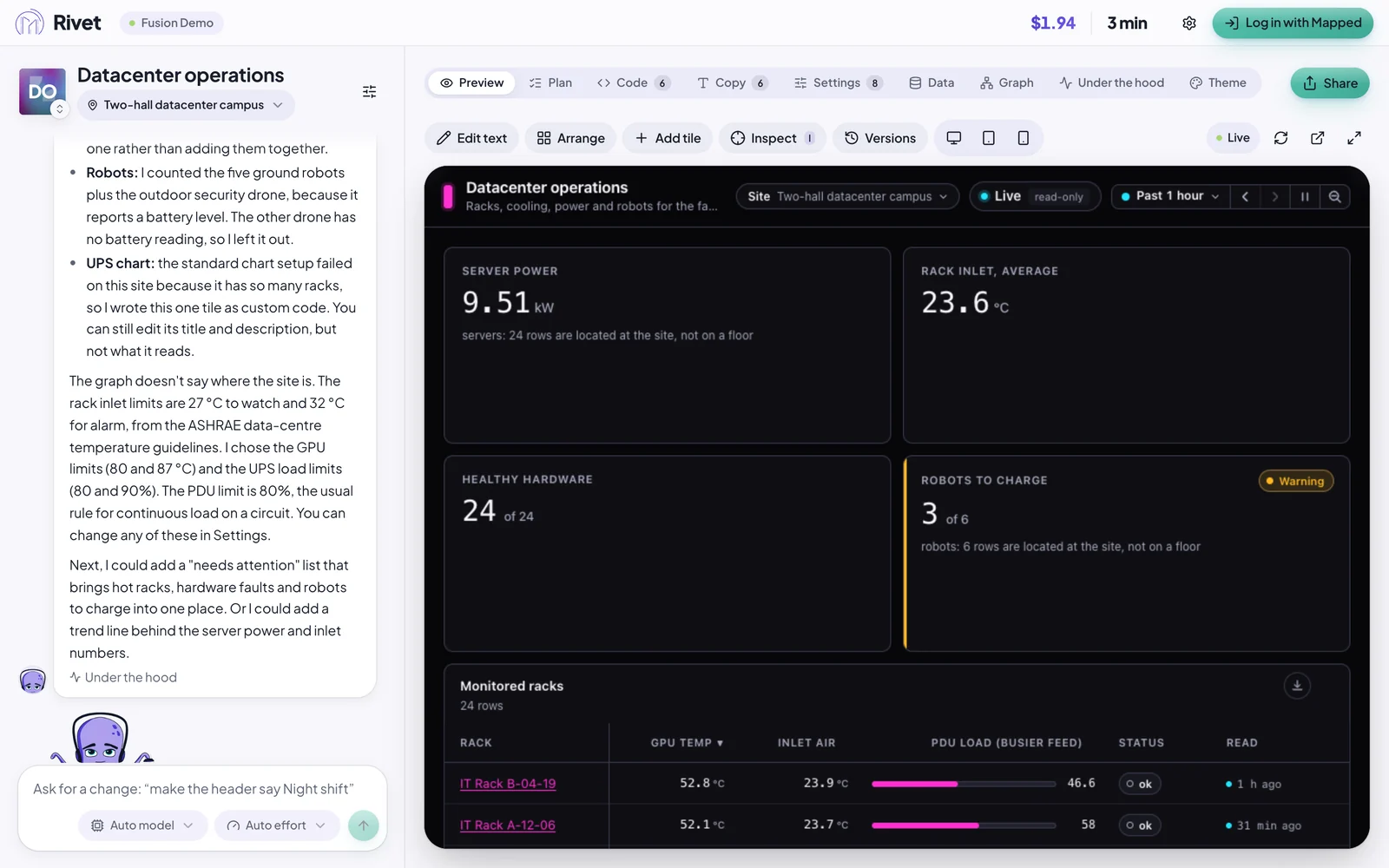
A datacenter operations board for the facility manager on duty. At the top, four headline numbers: power drawn by the servers, the average rack inlet temperature, how many racks report healthy hardware, and how many robots are below 30% battery. Below them: a table of the monitored racks, hottest GPU first, with GPU temperature, rack inlet temperature and PDU load; the cooling chain from the cooling towers to the chillers to each hall's air handlers…
In our run on 2026-10-16 it took Rivet three and a half minutes. Your first app builds this board step by step, with the whole description.
The templates
When you start an app, you choose what to start with. A template decides only the app's first page: a floor plan, a board, or nothing yet. Nothing is locked in. Any app can add a plan, a board, records or more pages later, and any app can have an assistant, switched on in its Settings tab.
| Template | What it starts with | Good for |
|---|---|---|
| Dashboard | A board of tiles, live charts and counters for an operator or an executive, arranged the way they like. | A control-room board, a morning summary for the chief engineer, a screen on the wall. |
| Plan Centric | A large floor plan, 2D with 3D on demand, a side panel of what the site has, and a time control to look back. | Seeing where things are: robots, forklifts, warm rooms, open doors. |
| Blank | Nothing yet: anything Rivet's building blocks and your site's data can make. | When neither of the others fits. |
Chat Assistant is no longer something you start from. An app made as one before keeps its assistant, and the Assistant switch in Settings now turns it on or off, as on any app.
Ideas Rivet suggests
When you pick a template on the home screen and choose Describe it, Rivet shows a few ideas as buttons under the description box, led by Ideas for and your site's name. They are chosen for the kind of site you picked, from what its data holds: an airport gets its gates, crowds and ground vehicles, a datacenter its racks, cooling and power, an office its air boxes, CO₂, doors, lights and washrooms, a store or club its refrigeration, comfort and shoppers, a warehouse its dock doors, forklifts and robots. While Rivet is still reading your site, the row says Looking at what … holds, for ideas that fit it… and shows nothing until it knows. A site Rivet recognises but has no ideas of its own for, or can't place, gets a few general ideas that fit any building, led by Some ideas to start from.
A site with vehicles also gets one idea about them when none of the others names vehicles, trucks, forklifts or a fleet: Vehicle board for a Dashboard, Vehicles on the plan for Plan Centric. A club with a truck court gets it after its refrigeration, comfort and shoppers.
A site with air handlers gets one idea about them in the same way, when none of the others names them: Air handlers for a Dashboard, Air handlers on the plan for Plan Centric. An airport whose card lists air handlers gets it after its gates, crowds, conveyors and vehicles; a datacenter's ideas already name its air handlers, so it gets none.
Hover an idea to read its description; press it to put the description in the box, then change the details to fit your site. These are Rivet's own words; we have not built and pictured each one here.
On an airport
- Dashboard: Gate board, Checkpoint and claim crowds, Baggage conveyors. For example: "A gate board for the terminal: which gates have an aircraft at them, which boarding bridges are in use and where ground power is on"
- Plan Centric: Gates on the plan, Crowds on the plan, Ground vehicles on the plan
On a datacenter
- Dashboard: Racks running hot, Cooling chain, Critical power. For example: "A board of the monitored racks, hottest GPU first, with rack inlet temperature and PDU load"
- Plan Centric: Hot racks on the plan, Cooling on the plan, Power on the plan
On an office
- Dashboard: Air boxes by floor, Air quality by floor, Doors, lights and washrooms. For example: "The variable air volume boxes on each floor: airflow against its setpoint and damper position, the boxes furthest off first"
- Plan Centric: Air boxes on the plan, Air quality on the plan, Lights and washrooms on the plan
On a store or club
- Dashboard: Refrigeration board, Comfort in the store, Shoppers and checkouts. For example: "A refrigeration board: every display case and walk-in against its setpoint, with alarms and defrosts, the warmest first"
- Plan Centric: Refrigeration on the plan, Comfort on the plan, Shoppers on the plan
On a warehouse
- Dashboard: Dock-door board, Fleet board, Comfort by zone. For example: "A dock-door board for my warehouse: which doors are open, how long, and which trucks are waiting"
- Plan Centric: Dock doors on the plan, Fleet on the plan, Comfort map by zone
On a site Rivet recognises but has no ideas for yet
A hospital, a school or a lab gets ideas that fit any building, and none from another kind of site.
- Dashboard: Comfort by floor, Air quality by floor, Equipment off normal
- Plan Centric: Comfort map by floor, Air quality on the plan, Equipment on the plan
On a site Rivet can't place
- Dashboard: Dock-door board, AHU and chiller energy, Comfort by floor
- Plan Centric: Robot fleet on the plan, Comfort map by floor, Dock doors on the plan
A Blank app offers the kind of site's three Dashboard ideas and its first Plan Centric one.